Dashboard
• Lot A Monitoring
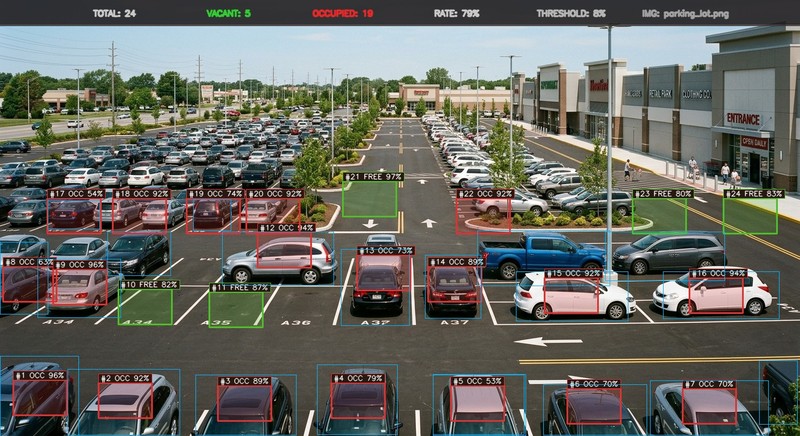
Total Spaces
24
Calibrated Lot Stalls
Occupied
19
Vehicles Parked
Vacant
5
Available Now
Occupancy Rate
79.2%
Facility Utilization
Revenue & Avg Time
$47.50
Avg Duration: 45m
Parking Occupancy Trend
Occupied
Vacant
Parking Map
Occupied
Vacant
Optimal
Recent Detections & Vehicle Recognition
Export CSV| Time | Bay ID | Category | Status | Vehicle & Color | Duration | Fee | Confidence | License Plate | Parking Lot |
|---|
📷
Click or Drop any Parking Lot Image to Analyze
Supports CCTV, Aerial Drone, Ground Perspective (PNG, JPG, WEBP)
Detection Settings
Sensitivity (Threshold)
8%
Bay Width
94 px
Bay Height
62 px
🎥
Real-Time CCTV Video Stream & Webcam Detection
Frame-by-frame live parking bay occupancy analysis at 25-30 FPS
28.5 FPS • LIVE
Real-Time CCTV Stream • 30 FPS Live Vision Texture & Overlap Detector
Source: CCTV Feed (live.mp4)
Live Stream Metrics
TOTAL BAYS
24
OCCUPIED
21
VACANT
3
OCCUPANCY
88%
🎯 Real-Time Optimal Bay
Bay #3 (Available • Closest to Entrance)
Live Activity Log
[LIVE] Monitoring video feed...
Zone Occupancy Matrix
| Zone Name | Total Capacity | Occupied | Vacant | Occupancy Rate |
|---|
3D Interactive Simulation Map • Digital Twin
Real-time WebGL spatial twin mapped directly from live.mp4 video stream
Live Telemetry Synced
Occupancy Rate by Zone
Space Distribution
🏢 Parking Facility Details
Displayed on screen headers and exported parking receipts.
Daily operating time for the parking facility.
Standard rate charged per hour.
Time allowed before hourly billing begins.
📹 Camera & Video Feed Settings
Choose which camera feed is monitored for available parking spaces.